A survey stack for K-12, from builder to PDF
A client needed a replacement for a survey platform that was being
retired. The new system had to import existing .qst
files, support a survey builder, store roster credentials, and
generate letter-size PDF reports. The QST files contained school
names, question order, and historical response data that had to
remain usable.
This is private work, so there is no public demo. The sections below describe how a survey moves through the system.
The builder writes a survey. The public taker writes responses. Reporting reads both and draws charts that can be compared across years. A roster CSV supplies per-student passwords when a survey is not meant to be an open form.
Survey management
Staff work from one table. Each row includes category, author, archive status, school, state, season, year, response count, and optional open and expire times. Those timestamps are stored in UTC and converted in the browser so a survey can open at a local midnight in another time zone.
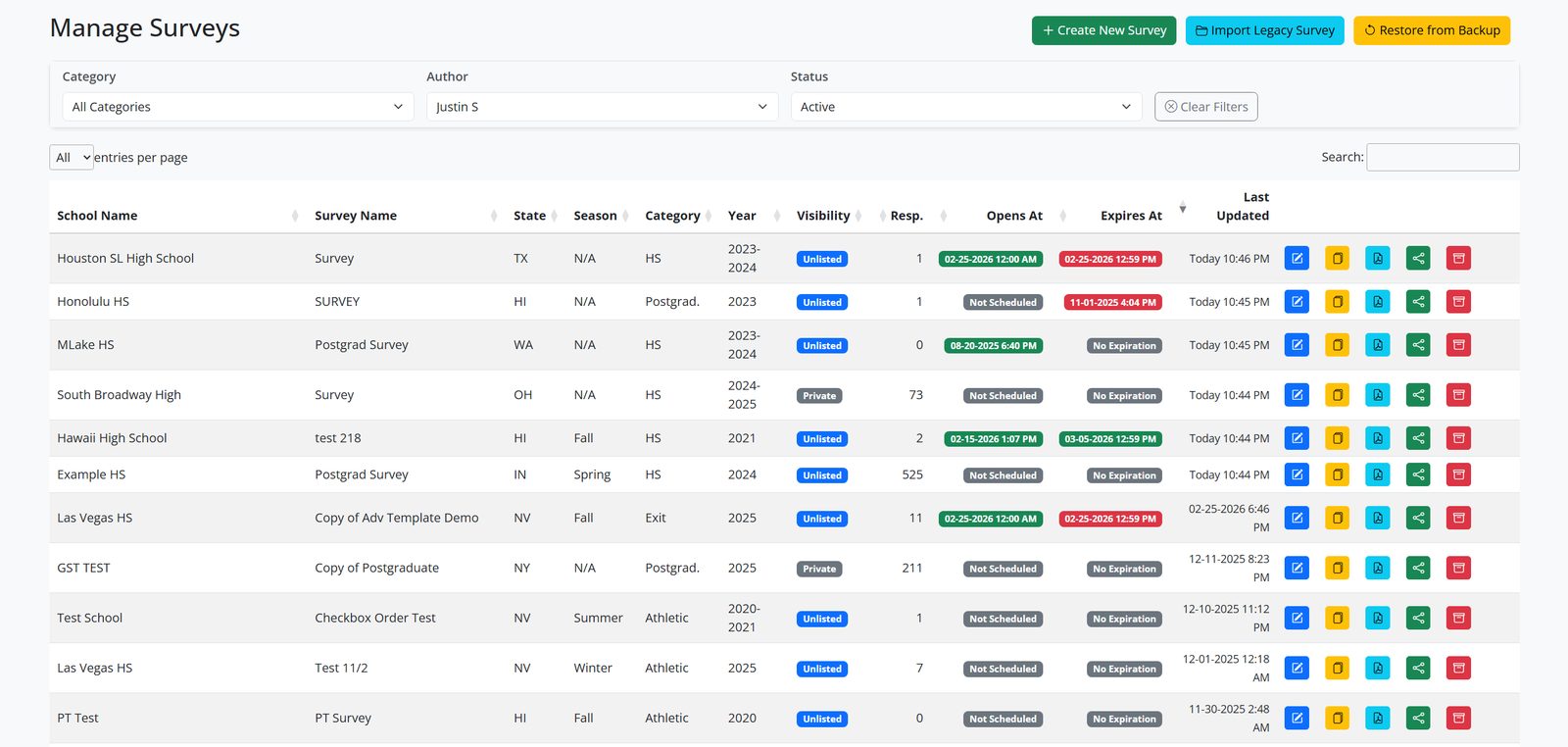
Visibility is private, unlisted, or public. Private surveys stay in
the admin table. Unlisted surveys are reachable only by link. Public
surveys appear on the homepage after a state is selected, and only
while the schedule window is open. Each survey has an 8-character
slug and an optional vanity path such as
/OH/oakridge-fall. Apache rewrites that path to a
database lookup. The UI copies the link to the clipboard and falls
back to a visible URL if the clipboard API is unavailable.
Duplicate copies a survey so a new season does not start from a blank form. DataTables provides sort, paging, and filters so staff can find a prior-year survey by school without a custom query.
Legacy import
The QST importer reads a .qst file and, optionally, a
CSV or DAT file of responses. A filename such as
OH_OakridgeHigh2023.qst is parsed for state, campus, and
school year. That campus guess is matched against existing school
names with a Levenshtein similarity cutoff of 0.7, after common
suffixes like "academy" and "high school" are stripped. A wrong
school name creates a duplicate campus. A wrong question order
breaks year-over-year charts.
The parser runs as a sequence of checks rather than a single conversion step.
function ingestLegacySurvey(file, extras = {}) {
  const meta = parseQstFilename(file.name);
  const school = findBestSchoolMatch(meta.schoolName);
  const qst = parseQst(file, { school, ...meta });
  const rows = extras.csv ? mapLegacyRows(qst, extras.csv) : [];

  assertQuestions(qst.questions);
  if (rows.length) assertColumnCount(qst, rows);

  return { title: qst.title, questions: qst.questions, responses: rows };
}
That is the structure of the importer, not the production file.
Question type codes from the old system map to SurveyJS types.
Checkboxes expand to one column per choice. Matrix questions flatten
to one column per row. Some DAT files begin with
RESPONSE_DATE=, so the mapper skips those leading cells
instead of shifting answers. Choice ids are preserved so an imported
survey can be edited in SurveyJS. The builder toolbox is limited to
text, comment, checkbox, radiogroup, dropdown, matrix, and HTML.
Custom toolbox questions are stored in MySQL as JSON and loaded into
SurveyJS. Reusing the same question name, such as
first_name, keeps reports aligned across schools even
when the visible title differs.
Student access and response data
A survey may require a password. When it does, staff upload a CSV of
first name, last name, password, and optional student number,
program, and email. An upload replaces the existing roster for that
survey. It runs in a transaction, validates headers, and rejects a
row with an invalid email. The taker looks up the password and fills
hidden fields named first_name or
student_number when those columns have values. Empty
cells are left empty.
Emails sometimes arrive after responses have been submitted. A
backfill updates the roster and uses MySQL JSON_SET on
stored responses, matching on the password already in the JSON.
$stmt = $pdo->prepare(
  'UPDATE survey_responses
      SET json_schema = JSON_SET(json_schema, "$.email", ?)
    WHERE survey_id = ?
      AND (
        JSON_UNQUOTE(JSON_EXTRACT(json_schema, "$.password")) = ?
        OR JSON_UNQUOTE(JSON_EXTRACT(json_schema, "$.Password")) = ?
      )'
);
Exports keep question order from the schema, including checkbox choice order, so a CSV can be downloaded and uploaded again without column drift. Names with apostrophes and accented characters are written through a UTF-8 endpoint.
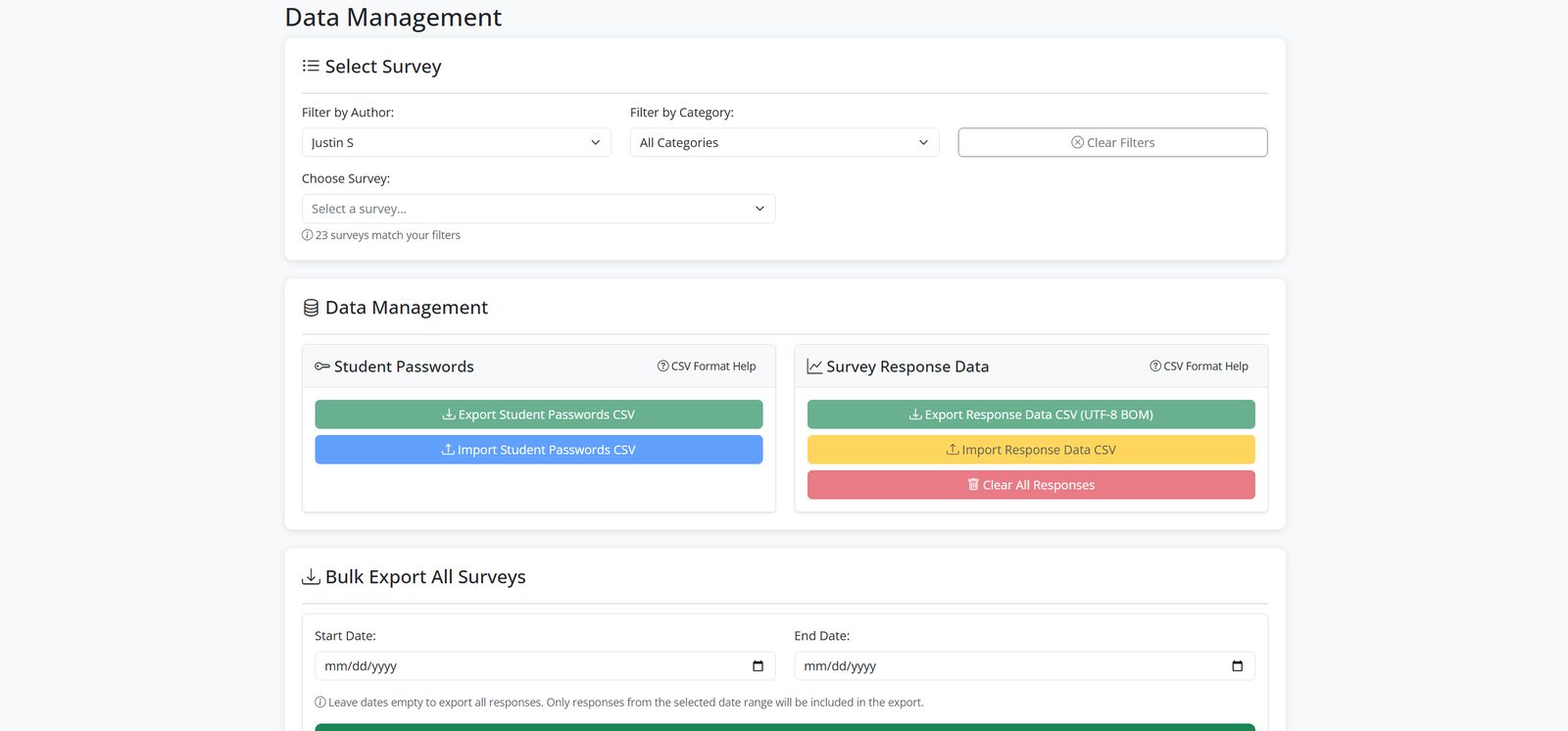
Nightly MySQL dumps are stored on the host. Restore selects a single survey from a SQL zip instead of importing the full dump.
Reporting and PDF export
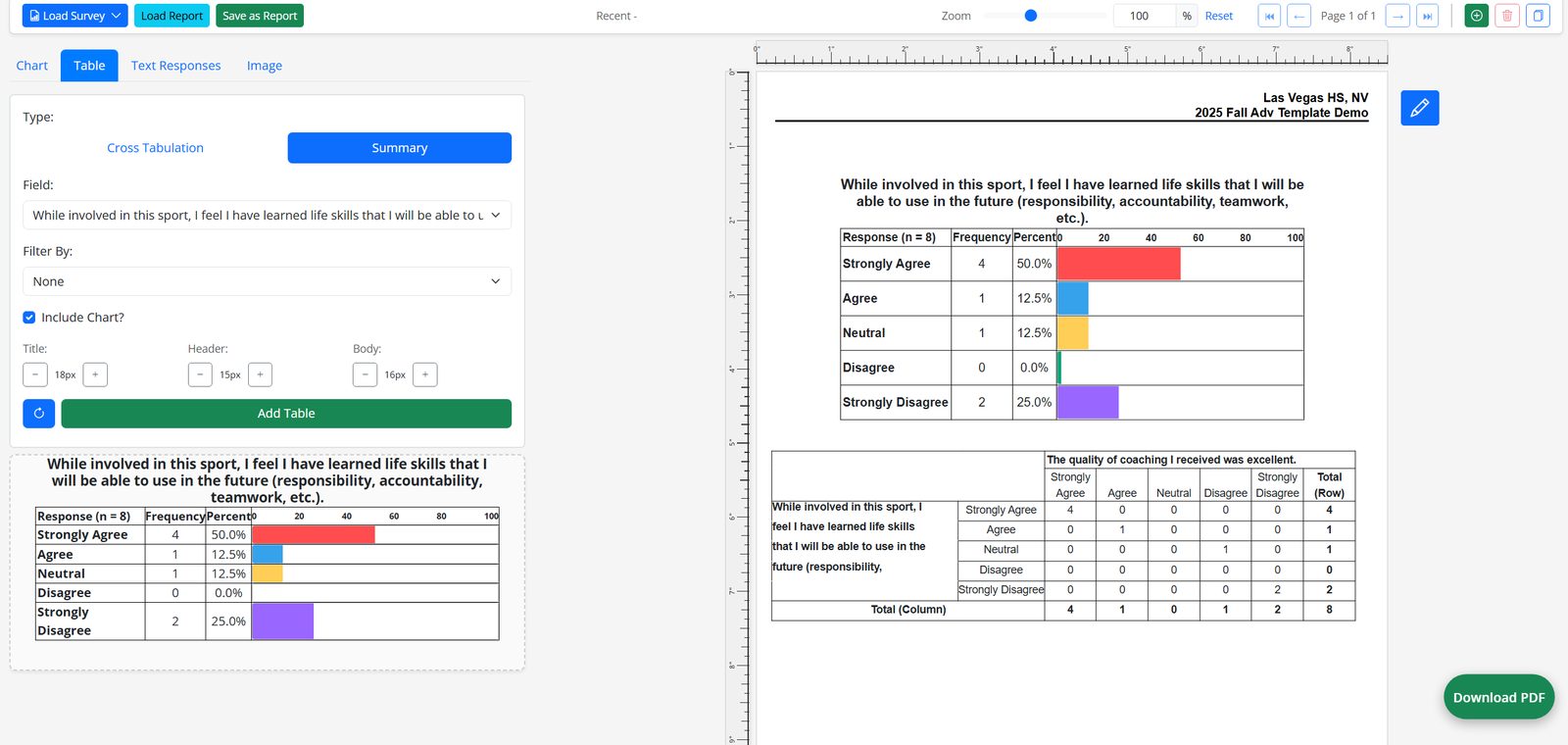
Reports are built on a grid. Charts and tables can be dragged, resized, centered, or deleted. Filtered summary tables can slice by question, answer choice, or a demographic field. A layout can be duplicated and renamed for a later year.
Comparison reports align questions across surveys. The matcher strips leading numbers and punctuation, then runs Fuse.js on titles so "4. I have a trusted adult at this school" can match "I have a trusted adult at this school." Manual mapping is available when a question was rewritten on purpose.
Page templates store empty chart frames. Advanced templates also store which question name feeds each chart. Comparison templates store the side-by-side layout.
html2canvas and jsPDF produce a letter-size document with a repeating
header and footer. Saving the file issues a shareable slug, serves
application/pdf inline, and increments a view count.
Report URLs are sent with a noindex robots header.
Notable security features
-
Admin state-changing requests require a CSRF token in the
X-CSRF-TOKENheader or theXSRF-TOKENcookie, compared with the session token usinghash_equals. -
Logins use
password_verifyagainst stored hashes and return a generic error so valid emails cannot be enumerated. - Session cookies are HttpOnly, Secure on HTTPS, and SameSite Lax.
- Database access uses prepared statements. Roster names, emails, and student numbers are never concatenated into SQL.
-
Responses set
X-Content-Type-Options: nosniff,X-Frame-Options: SAMEORIGIN, and a Content-Security-Policy. CORS is limited to an allowlist of site origins. -
Uploads are rejected when the request body exceeds
post_max_size. PDF uploads are checked withfinfobefore they are written to disk. -
Backup restore runs filenames through
basenameandrealpathso a path cannot leave the backup directory. - CSV roster uploads validate required headers and email format inside a transaction. Invalid rows abort the replace.
- Shared PDF links are noindexed. Surveys can be private, unlisted, or public, with optional per-student passwords.